Outcome: 30% more form templates built and 25% more completed by clients — month on month, post-launch. Powered by AI-assisted form building (half-day builds → 2 minutes) and conditional logic that cuts client-facing questions by ~40% on long forms.
The challenge
Law firms rely on long, complex intake forms (client care questionnaires, matter-specific fact-finds, compliance declarations) often with 100+ questions. That created pain on both sides.
For the firm, building and maintaining these forms was slow and fragile. In the legacy model, questions lived inline inside workflow steps: no reuse, no versioning, and every change meant reworking the workflow itself. A single conveyancing or private client form could take half a day or more to recreate in the product.
For the end client, every question appeared regardless of relevance. “Are you married?” was followed by ten follow-ups about divorce, even when they answered “No.” Completion rates suffered, support queries went up, and the experience felt more like paperwork than a modern digital journey.
The brief wasn’t just “add a form builder.” It was to reduce build time for lawyers, shorten the path for clients, and fit naturally into Engage, Legl’s client onboarding workflows. And I gave myself the challenge of designing, building, and shipping this feature in just 2 weeks.
The solution
I designed Custom Forms as a three-part system: a visual builder with conditional logic, AI-powered document import, and conversational refinement via chat.
1. Visual builder with conditional logic
I designed a dedicated form editor with sections, rich field types (text, yes/no, dropdowns, dates, file uploads, and more), and a draft → publish → version lifecycle so forms can evolve without breaking live workflows.
The piece I’m proudest of is the conditional logic. I made the call to apply it at both field and section level, so a question or a whole section can be shown only when prior answers match rules: equals, not equals, in list, numeric comparisons, empty / not empty. Hiding a whole section, rather than just a single field, was the design lever that did the most work for client experience. The builder enforces sensible ordering so dependent items must come after what they depend on, and clients only see what applies to them.
Forms are reusable templates: attach the same published form to multiple Engage workflows, manage assignments from one place, and preview exactly what the client will see before go-live.
2. Smart Upload: import from what you already have
Most firms already had the form somewhere. It might be a PDF, Word doc, spreadsheet, or even a scan. I designed Smart Upload around that reality: lawyers upload the file, AI extracts the structure, and they land in the builder with sections and questions pre-populated in one or two minutes.
Supported formats include PDF, Word, Excel, PowerPoint, CSV, plain text, RTF, and common image types, matching how firms actually store templates today. From there, lawyers tweak, add logic, and publish. No manual re-keying of a 40-page questionnaire.
3. Smart Edit: refine with chat
Once a draft exists, Smart Edit opens a side panel where lawyers describe changes in plain language: “Add a section for overseas property if they answered Yes to owning property abroad,” or “Make the NI number optional for non-UK clients.”
The system applies those requests to the draft structure and returns a conversational summary. I made the deliberate choice that every change has to remain visible and editable in the builder. Smart Edit complements the visual editor; it doesn’t replace it.
How it fits together
Lawyers start either from a blank form or by uploading an existing document. Smart Upload converts that document into a structured draft. The visual builder is where they refine sections, add conditional logic, and preview the client view; Smart Edit lets them make natural-language changes alongside that visual editing. When they’re ready, they publish, and the template attaches as a workflow step in Engage, where end clients see only the questions that apply to them.
Design decisions I made
| Decision | Context |
|---|---|
| Reusable templates over inline workflow questions | Firms build once, use everywhere. Versioning protects live matters when templates change. |
| Logic on sections, not just fields | Large legal forms are organised by topic; hiding whole sections cuts client effort far more than hiding individual fields. |
| Import + chat, not import-only | AI extraction gets you 80%. Lawyers need precise control and domain-specific tweaks for the last 20%. |
| AI edits applied to drafts only | Published forms stay stable for in-flight client matters; every change flows through explicit publish. |
| Preview tab in the builder | Lawyers validate branching behaviour before clients see it, which is non-negotiable for compliance forms. |
Outcomes
| Metric | Result |
|---|---|
| Time to create a form (with Smart Upload) | 2–4 hours saved on average vs building from a Word/PDF manually |
| Client question load on 100+ question forms with logic | ~40% reduction in questions clients actually answer |
Qualitatively, firms can now digitise legacy paper and Word templates in minutes, then branch intelligently, instead of sending every client the same monolithic PDF.
Key performance indicators: 30 days after release
- 30% increase in custom form templates created compared to previous month

- 25% increase in the number of custom forms completed (by clients) compared to previous month
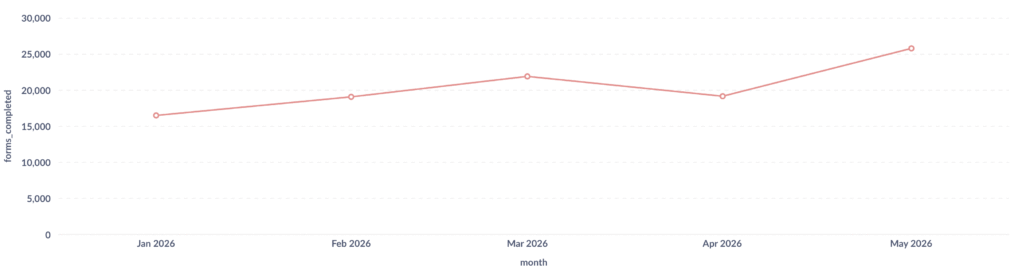
- 58 custom form templates created which include conditional logic
A real example
A family law firm had a 120-question Word intake form used on every new matter. Previously, a fee-earner would spend an afternoon rebuilding it in the platform, or worse, send the Word file and chase email replies.
With Smart Upload, they imported the document and had a structured draft in under two minutes. They added conditional sections (minors, property abroad, prior litigation) so clients only saw relevant blocks. Smart Edit helped them reword questions and add a document-request step without clicking through dozens of field modals.
Published once, the form attached to three Engage workflows. Clients reported the form felt “much shorter”; analytics showed they answered ~40% fewer questions on average.alytics showed they answered ~40% fewer questions on average.